

Poppo agency registration online | How to Register Poppo Live Agent
1. Download Poppo Live.
2. Create an Account on Poppo Live App
3. Copy Your Poppo ID from the profile.
4. Click on the Agency Registration Link .
5. Enter Poppo ID & Click “Get”.
6. Find the verification code in Poppo messages
7. Enter the Verification Code & submit.
NOTE : If you are an Indian user then download Vone App from Play Store instead of Poppo Live and follow the same process above to become an agent.
How to become Poppo Live Host?
Method 1: Host Registration with Agent ID
1. Download Poppo App Install & Register on the Poppo App.
2. The host needs to click on ‘My Agent’ from the profile options.
3. Enter Agent ID 29263079 & Apply to join the agency.

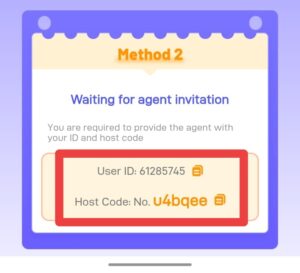
Method 2: Become a Host through an Invitation
1. Download Poppo App Install & Register on the Poppo App.
2. Find the Poppo ID & Host Code (To check ID & Host Code, Click on the ‘My Agent’ Option in the Profile.)
3. Submit the form with the correct details OR send us your Poppo ID & Host Code on Whatsapp at +917665229616
NOTE : If you are an Indian user then download Vone App from Play Store instead of Poppo Live and follow the same process above to become an host.